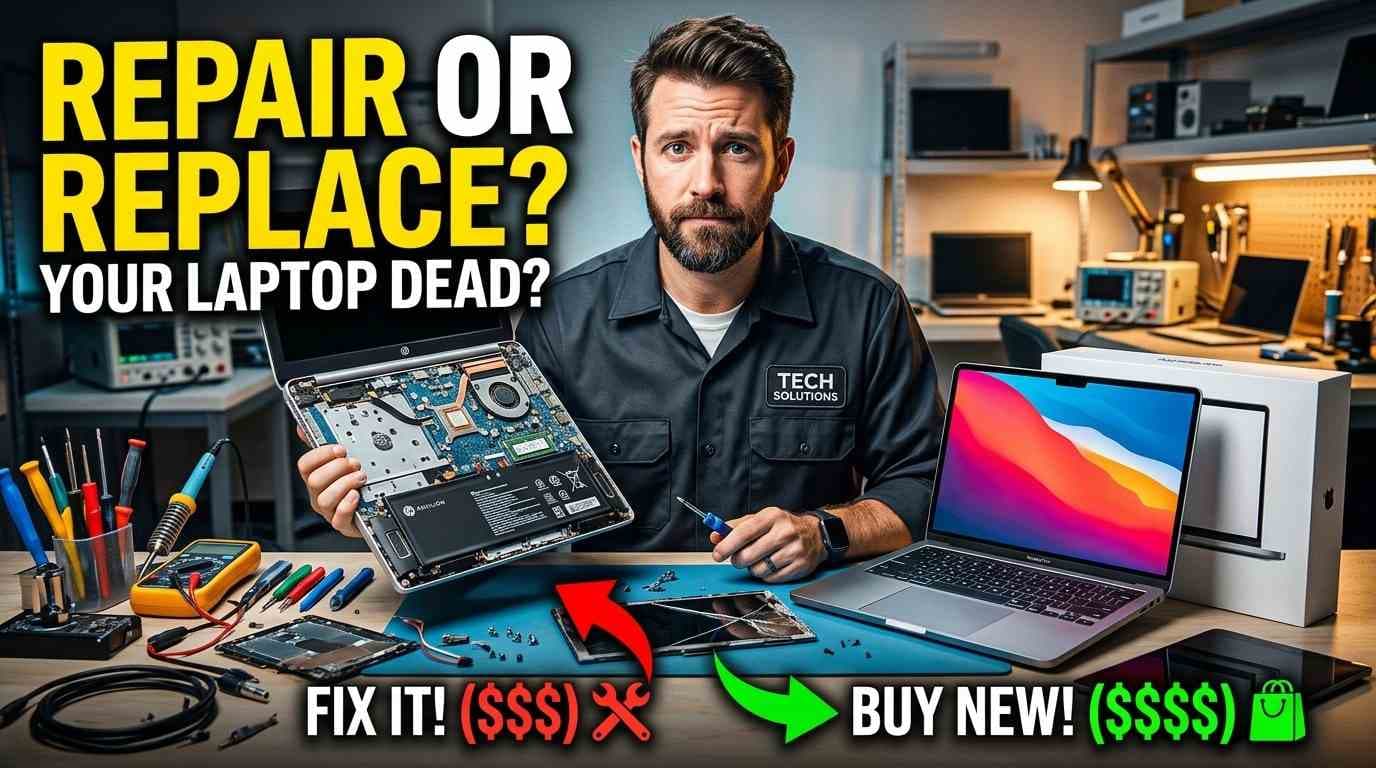
Should I Repair or Replace My Laptop? A Complete Guide
A slow laptop, a failing battery, or a cracked screen can leave you wondering: Should I repair or replace my laptop? Buying a new device may seem like the easiest solution, but many common laptop problems can be fixed for much less than the cost of replacement.
The right decision depends on several factors, including your laptop’s age, the type of damage, repair costs, performance, software support, and how well the device meets your needs. A simple battery replacement or SSD upgrade may give your laptop a new lease on life, while repeated hardware failures could make replacing it the more practical choice.
For students, professionals, remote workers, and businesses in Mountain View, California, understanding these factors can help you make a cost-effective decision without spending more than necessary.
At Quick Fix Computer Services, we understand that replacing a laptop is a significant expense. This guide explains when laptop repair makes sense, when buying a new device may be the better option, and how to evaluate your choices before investing in a replacement.
Quick Answer: Should You Repair or Replace Your Laptop?
Repair your laptop if the problem is isolated, the device still meets your needs, replacement parts are available, and the repair costs significantly less than purchasing a comparable new laptop.
Replace your laptop if it has multiple recurring hardware problems, cannot run the software you need, no longer receives essential security updates, or requires expensive repairs that offer limited long-term value.
There is no single rule that works for every laptop. The best decision comes from comparing the repair estimate with the cost, capabilities, and expected lifespan of a suitable replacement.
1. How Old Is Your Laptop?
Laptop age is a useful starting point, but it should not be the only factor in your decision.
A well-maintained laptop can remain useful for years, while a newer device may need repair after accidental damage or component failure. What matters most is its overall condition and whether its hardware and software still support your everyday tasks.
When repairing an older laptop makes sense
Repair may be worthwhile if your laptop:
Still handles your everyday applications comfortably.
Has a single problem, such as a damaged screen or worn battery.
Supports the operating system and software you need.
Has compatible replacement parts available.
Can be repaired at a reasonable cost.
For example, a laptop that works well but no longer holds a charge may only need a battery replacement. Replacing the entire device could be unnecessary if the rest of the hardware remains reliable.
When laptop age becomes a concern
Replacement deserves consideration when an older laptop struggles with everyday applications, experiences repeated hardware failures, or cannot receive the security updates needed to use it safely.
Before replacing the device, check whether a repair or hardware upgrade could resolve the underlying problem. A professional diagnosis can help distinguish normal performance limitations from faults that are actually repairable.
2. Compare Laptop Repair Costs With Replacement Costs
One of the most important factors in deciding whether to repair or replace a laptop is the total cost of each option.
A repair estimate should be compared with the price of a replacement that meets your actual requirements, not necessarily the most expensive new model.
Consider the following questions:
How much will the repair cost, including parts and labor?
Is the repair likely to restore dependable performance?
Are other components showing signs of failure?
How much would a suitable replacement cost?
Will the new device require additional spending on software, accessories, setup, or data transfer?
What is the 50% rule for laptop repair?
A commonly used guideline is to reconsider a repair when its cost approaches half the price of a comparable replacement laptop.
However, this is only a starting point, not a universal rule. A more expensive repair might still make sense for a high-performance laptop that meets your needs, while a relatively inexpensive repair may not be worthwhile if the device is already unreliable or no longer supports essential software.
Example: Imagine your laptop needs a repair costing $180, while a suitable replacement costs $800. Repairing it may be a sensible option if the device is otherwise in good condition.
Now imagine a much older laptop needs a $450 motherboard repair and already struggles to run your applications. Investing in a replacement may offer better long-term value.
These figures are illustrative examples, not quoted repair prices. Actual costs depend on the laptop model, parts, and extent of the damage.
3. Which Laptop Problems Are Usually Worth Repairing?
Many laptop issues can be resolved without purchasing a new computer. If the fault is limited to a replaceable component, repairing the existing device may be the more economical choice.
Laptop battery no longer holds a charge
A battery that drains quickly, fails to charge fully, or causes unexpected shutdowns can make a laptop difficult to use.
If the rest of the laptop works properly, replacing the battery may restore convenient portable use without the expense of a new device.
However, charging problems can also result from a faulty adapter, damaged charging port, or internal hardware issue. Diagnosing the cause first can prevent unnecessary spending.
Cracked or flickering laptop screen
A cracked display, flickering screen, or lines across the display do not automatically mean your laptop needs replacing.
If the underlying system still works, screen replacement may be a practical solution. The decision depends on the display type, availability of parts, repair cost, and overall condition of the laptop.
Slow laptop performance
A slow laptop may need maintenance or an upgrade rather than replacement.
Possible causes include insufficient memory, limited storage, an aging hard drive, excessive background applications, overheating, or software problems.
Depending on the laptop model, an SSD upgrade, RAM upgrade, cooling-system service, or software troubleshooting may improve performance significantly.
Before buying a new laptop because your current one feels slow, identify what is causing the slowdown.
Overheating and loud fan noise
A laptop that becomes unusually hot, runs its fans constantly, or shuts down during demanding tasks may have a cooling problem.
Dust buildup, obstructed airflow, or a cooling-system fault can contribute to overheating. A technician can inspect the device and determine whether cleaning, cooling-system service, or another repair is appropriate.
Persistent overheating should not be ignored because it can affect performance and may contribute to further hardware problems.
Damaged keyboard or charging port
Unresponsive keys, a malfunctioning keyboard, or a loose charging connection may be repairable without replacing the entire laptop.
The key question is whether the problem is limited to one component or is part of more extensive damage, such as liquid exposure affecting internal circuitry.
When repairs may become expensive
Some faults are more complicated and can make replacement worth considering:
Motherboard or major internal component failure.
Severe liquid damage or corrosion.
Multiple components failing around the same time.
Repeated crashes that persist after troubleshooting.
Hardware that is difficult or uneconomical to replace.
Even in these cases, a diagnosis is useful. It helps establish whether the device can be repaired and whether the expected result justifies the expense.
4. Signs It May Be Time to Replace Your Laptop
Repairing a laptop is not always the best investment. Sometimes, putting that money toward a newer device makes more sense.
Consider replacing your laptop if several of the following conditions apply.
Your laptop has multiple recurring problems
If the battery is failing, the laptop overheats, and the system frequently crashes, you may be dealing with more than one isolated fault.
Repairing each problem separately could become expensive. Compare the combined repair estimate with the cost of a replacement and consider how reliable the device is likely to be afterward.
It can no longer handle your workload
Your laptop may turn on and function correctly but still fail to meet your needs.
For example, video editing, software development, data analysis, and other demanding tasks may require more processing power, memory, or graphics performance than an older device can provide.
If your workload has changed substantially, upgrading to a more capable laptop may be more effective than investing in hardware that cannot deliver the performance you need.
It no longer receives necessary security updates
Operating-system support matters just as much as hardware condition.
If your laptop cannot run a supported operating system or receive essential security updates, it may expose you to avoidable security risks. Check the manufacturer's support information and the requirements of the software you rely on before deciding.
A hardware repair cannot solve an operating-system support limitation if the device is incompatible with newer versions.
The laptop has suffered serious liquid damage
Liquid exposure can affect the keyboard, battery, motherboard, storage, and other internal components. The extent of the damage may not be immediately visible.
Some devices can be repaired after liquid damage, but the outcome depends on the affected components and the severity of the exposure.
If the laptop contains important files, prioritize data recovery and avoid repeatedly powering on a potentially damaged device. A professional assessment can help determine whether repair or replacement is more practical.
You have already paid for repeated repairs
A single repair may be worthwhile, but repeated expenses can change the calculation.
Review what you have spent recently, what the laptop needs now, and whether further repairs are likely to provide dependable use. Comparing the total cost of ownership can help you avoid continuing to invest in a device that no longer serves you well.
5. Can Upgrading Your Laptop Be Better Than Replacing It?
Yes. In some cases, a hardware upgrade offers a middle ground between repairing a fault and buying a new computer.
An upgrade may be especially useful when your laptop is otherwise functional but struggles with a specific performance limitation.
SSD upgrade
Replacing a compatible traditional hard drive with a solid-state drive (SSD) can improve startup times, application loading, and general responsiveness.
An SSD upgrade is particularly worth investigating if the laptop feels slow despite having no major hardware faults. The improvement depends on the existing hardware and the cause of the slowdown.
RAM upgrade
Random access memory (RAM) helps your laptop manage active applications and tasks.
If your laptop becomes sluggish when you open many browser tabs or run multiple applications, adding memory may help, provided the model supports a RAM upgrade and the current memory capacity is a limiting factor.
Some modern laptops have soldered memory that cannot be upgraded, so compatibility should be checked first.
Battery replacement
A replacement battery can restore portability if your laptop still performs well when connected to power.
This can be a practical choice for students, professionals, and remote workers who need their existing device to last through classes, meetings, or work sessions away from a desk.
Cooling-system service
If overheating is contributing to slow performance, servicing the cooling system may help the laptop operate more consistently.
However, overheating can have several causes. A technician should identify the underlying issue rather than assuming that cleaning alone will resolve it.
Important: Upgrades are not available for every laptop. Confirm compatibility, expected performance benefits, and total cost before proceeding.
6. What Should You Do Before Repairing or Replacing Your Laptop?
Before spending money, take a few practical steps to protect your files and make an informed decision.
Step 1: Back up your important files
Save important documents, photographs, work files, and other data to a secure backup location if the laptop is operating safely enough to do so.
If the laptop is showing signs of storage failure, repeatedly crashing, or suffering liquid damage, avoid unnecessary use and seek professional advice. Continued operation can sometimes make data recovery more difficult.
Step 2: Identify the actual problem
Write down the symptoms you have noticed. Does the battery drain quickly? Does the laptop overheat? Is the display damaged? Does the computer crash when running particular applications?
Clear observations can help narrow down possible causes, but symptoms alone do not always identify the faulty component.
Step 3: Request a repair estimate
Ask what is causing the problem, which components need attention, and what the estimated cost includes.
If the repair is expensive, ask whether the laptop has any other known issues that could affect its future reliability.
Step 4: Compare suitable replacement options
Look for a replacement that matches your actual requirements, including memory, storage, processing power, battery life, software compatibility, and warranty.
Avoid comparing the repair cost with the price of a much more powerful laptop than you need. A fair comparison should reflect the device that would realistically replace your current one.
Step 5: Consider the cost of downtime
For students and professionals, a laptop that is unavailable for several days can disrupt important work. Businesses may also need to account for lost productivity, device setup, data transfer, and employee downtime.
Ask about the expected repair timeline and parts availability before deciding. If replacement is necessary, plan the transition to minimize disruption.
7. Laptop Repair in Mountain View, California
If you are looking for laptop repair in Mountain View, CA, a professional diagnosis can help you understand whether repairing your current laptop is a sensible investment.
Quick Fix Computer Services helps customers troubleshoot common laptop problems, including screen damage, battery issues, charging problems, overheating, slow performance, and hardware faults. Depending on the laptop model and condition, repair options may include component replacement, hardware upgrades, or further diagnostics.
Before deciding to replace your laptop, consider getting the issue diagnosed and comparing the recommended repair with the cost of a suitable replacement.
Quick Fix Computer Services
1398 W El Camino Real E
Mountain View, CA 94040
Phone: (650) 968-2400
Our goal is to help you understand your options so you can make an informed decision about repairing or replacing your device.
Frequently Asked Questions
Is it worth repairing a laptop?
Laptop repair is often worthwhile when the problem affects one replaceable component, the device still meets your needs, and the repair costs considerably less than a comparable replacement. If the laptop has multiple failures or cannot run the software you need, replacement may be a better investment.
How many years should a laptop last?
Laptop lifespan varies depending on build quality, usage, maintenance, and software requirements. Rather than relying on age alone, evaluate performance, hardware condition, security support, and the cost of any necessary repairs.
Is it worth replacing a laptop battery?
Battery replacement may be worthwhile if the laptop otherwise works well and the battery is the main issue. Before replacing it, confirm that the problem is not caused by the charger, charging port, or another hardware fault.
Should I repair or replace a slow laptop?
Start by identifying why it is slow. An aging storage drive, limited RAM, excessive background applications, overheating, or software problems may be responsible. An SSD or RAM upgrade may help compatible laptops, while a device that cannot meet your workload requirements may need replacement.
Is it worth repairing a laptop screen?
Screen repair can make sense when the display is the main problem and the laptop is otherwise functional. The cost depends on the laptop model, display type, and parts availability. Compare the estimate with the value and condition of the device before proceeding.
Should I repair a laptop with liquid damage?
Liquid damage requires careful assessment because it can affect multiple internal components. Stop using the laptop if it may be unsafe to operate, avoid repeatedly powering it on, and seek professional advice. If the device contains important data, mention that before any repair begins.
What is the 50% rule for laptop repair?
The 50% rule is a general guideline suggesting that a repair approaching half the cost of a comparable replacement deserves careful reconsideration. It is not a strict rule. The laptop's age, condition, expected remaining life, and suitability for your needs also matter.
Where can I get laptop repair in Mountain View, CA?
Quick Fix Computer Services provides laptop repair services in Mountain View, California. The appropriate repair depends on the laptop model and the problem, so a diagnosis can help determine the available options.
Final Verdict: Repair or Replace Your Laptop?
The best choice is not always the newest laptop or the cheapest repair. It is the option that delivers reliable performance, protects your data, and makes financial sense for your needs.
If your laptop has one repairable problem and still performs well, repairing or upgrading it may extend its useful life. If it has recurring hardware failures, cannot support your essential software, or requires expensive repairs with an uncertain outcome, replacement may be the smarter long-term decision.
For laptop owners in Mountain View, California, start with an accurate diagnosis, compare the repair estimate with a suitable replacement, and consider your performance and security requirements before making the final call.
Not sure whether your laptop is worth repairing? Contact Quick Fix Computer Services to discuss your laptop's symptoms and explore your repair options before committing to a replacement.
Need Help?
Our technicians are here to help with any tech issue. Free diagnostics on all repairs.
Schedule a Repair